Programming Assignment IV: MPI Programming
Parallel Programming by Prof. Yi-Ping You
Due date: 23:59, November 13, Thursday, 2025
The purpose of this assignment is to familiarize yourself with MPI programming.
Table of contents
- Programming Assignment IV: MPI Programming
- 0. Using Workstation
- 1. Part 1: Getting Familiar with MPI Programming
- 1.1 MPI Hello World, Getting Familiar with the MPI Environment
- 1.2 Calculating PI with MPI
- 1.2.1 MPI Blocking Communication & Linear Reduction Algorithm
- 1.2.2 MPI Blocking Communication & Binary Tree Reduction Communication Algorithm
- 1.2.3 MPI Non-Blocking Communication & Linear Reduction Algorithm
- 1.2.4 MPI Collective: MPI_Gather
- 1.2.5 MPI Collective: MPI_Reduce
- 1.2.6 MPI Windows and One-Sided Communication & Linear Reduction Algorithm
- 2. Part 2: Matrix Multiplication with MPI
- 3. Requirements
- 4. Grading Policy
- 5. Evaluation Platform
- 6. Submission
- 7. References
We provide workstations dedicated to this course. You can access the workstations by ssh or use your own environment to complete the assignment.
| Hostname | IP |
|---|---|
| hpclogin[01-03].cs.nycu.edu.tw | 140.113.17.[101-103] |
Login example:
ssh <username>@hpclogin[01-03].cs.nycu.edu.tw
Additionally, we have configured the environment for you, which MUST be activated before running the assignment code using the following command:
module load ppYou can leave the environment by typing
module unload pp.
Get the source code:
wget https://nycu-sslab.github.io/PP-f25/assignments/HW4/HW4.zip
unzip HW4.zip -d HW4
cd HW4
0. Using Workstation
In this assignment, you’ll need to use run --mpi=pmix to run MPI programs on our workstation. Unlike previous assignments where physical threads were allocated with option -c, here you’ll need to specify the number of nodes and the number of processes using the -N and -n options, respectively, to run your program.
Here are several examples of how to run an MPI program:
run --mpi=pmix -N 4 -- ./mpi_hello
Run on 4 dedicated nodes with 4 processes (1 process per node):
run --mpi=pmix -N 4 -n 4 -- ./mpi_hello
Run on 2 dedicated nodes with 4 processes (2 processes per node):
run --mpi=pmix -N 2 -n 4 -- ./mpi_hello
You can experiment with different configurations; in this assignment, the testing script will evaluate various configurations, and your program should execute successfully for all of them.
1. Part 1: Getting Familiar with MPI Programming
1.1 MPI Hello World, Getting Familiar with the MPI Environment
Here we’re going to implement our first MPI program.
Expected knowledge includes basic understanding of the MPI environment, how to compile an MPI program, how to set the number of MPI processes, and retrieve the rank of the process and number of MPI processes at runtime.
There is a starter code for you. Look at hello.c. Please finish the TODOs with the MPI_Comm_size and MPI_Comm_rank functions.
Let’s first compile hello.c:
mpicc hello.c -o mpi_hello
Use run to start MPI processes:
run --mpi=pmix -N 8 -n 8 -- ./mpi_hello
This command will launch eight processes to run mpi_hello on eight nodes (each node run one process), and you should be able to get an output similar to:
Hello world from processor cmpt048.hpc.cc.cs.nctu.edu.tw, rank 2 out of 8 processors
Hello world from processor cmpt046.hpc.cc.cs.nctu.edu.tw, rank 0 out of 8 processors
Hello world from processor cmpt049.hpc.cc.cs.nctu.edu.tw, rank 3 out of 8 processors
Hello world from processor cmpt047.hpc.cc.cs.nctu.edu.tw, rank 1 out of 8 processors
Hello world from processor cmpt051.hpc.cc.cs.nctu.edu.tw, rank 5 out of 8 processors
Hello world from processor cmpt052.hpc.cc.cs.nctu.edu.tw, rank 6 out of 8 processors
Hello world from processor cmpt050.hpc.cc.cs.nctu.edu.tw, rank 4 out of 8 processors
Hello world from processor cmpt053.hpc.cc.cs.nctu.edu.tw, rank 7 out of 8 processors
Code Implementation: (8 points)
- Complete
hello.c: the Hello World code in C. - Your program should run correctly.
- The argument of
-Nis expected to be any positive integer less than or equal to 16.
1.2 Calculating PI with MPI
In this exercise, we are going to parallelize the calculation of Pi following a Monte Carlo method and using different communication functions and measure their performance.
Expected knowledge is MPI blocking and non-blocking communication, collective operations, and one-sided communication.
Instructions: Write different versions of MPI codes to calculate Pi. The technique we are implementing relies on random sampling to obtain numerical results. You have already implemented this in the previous assignments.
1.2.1 MPI Blocking Communication & Linear Reduction Algorithm
In our parallel implementation, we split the number of iterations of the main loop into all the processes (i.e., NUM_ITER / num_ranks). Each process will calculate an intermediate count, which is going to be used afterward to calculate the final value of Pi.
To calculate Pi, you need to send all the intermediate counts of each process to rank 0. This communication algorithm for reduction operation is called linear as the communication costs scales as the number of processes.
An example of linear reduction with eight processes is as follows:

Rank 0 is going to receive the intermediate count calculated by each process and accumulate them to its own count value. (Rank 0 also needs to calculate a count, and this stands for the following sections in Part One.) Finally, after rank 0 has received and accumulated all the intermediate counts, it will calculate Pi and show the result, as in the original code.
Implement this code using blocking communication and test its performance.
- Change the main loop to include the number of iterations per process, and not
NUM_ITER(which is the total number of iterations).- Do not forget to multiply the seed of
srand()with the rank of each process (e.g.,rank * SEED) to ensure the RNGs of processes generate different random numbers.
There is a starter code pi_block_linear.c for you.
mpicc pi_block_linear.c -o pi_block_linear; run --mpi=pmix -N 4 -n 4 -- ./pi_block_linear 1000000000
Code Implementation: (12 points)
- Complete
pi_block_linear.c: the MPI block communication for PI. - Implement the code using a linear algorithm with
MPI_Send/MPI_Recv. - Do not modify the output messages.
mpicc pi_block_linear.c -o pi_block_linear; run --mpi=pmix -N 4 -n 4 -- ./pi_block_linear 1000000000should run correctly.- The argument of
-Nis expected to be any positive integer less than or equal to 16. - Your program’s execution time should not be more than 15% slower than the TA’s reference time.
1.2.2 MPI Blocking Communication & Binary Tree Reduction Communication Algorithm
Implement the binary tree communication algorithm for performing the reduction on rank 0 using blocking communication (e.g., MPI_Send/MPI_Recv).
The communication pattern for a reduction with a binary tree with eight processes is as follows:
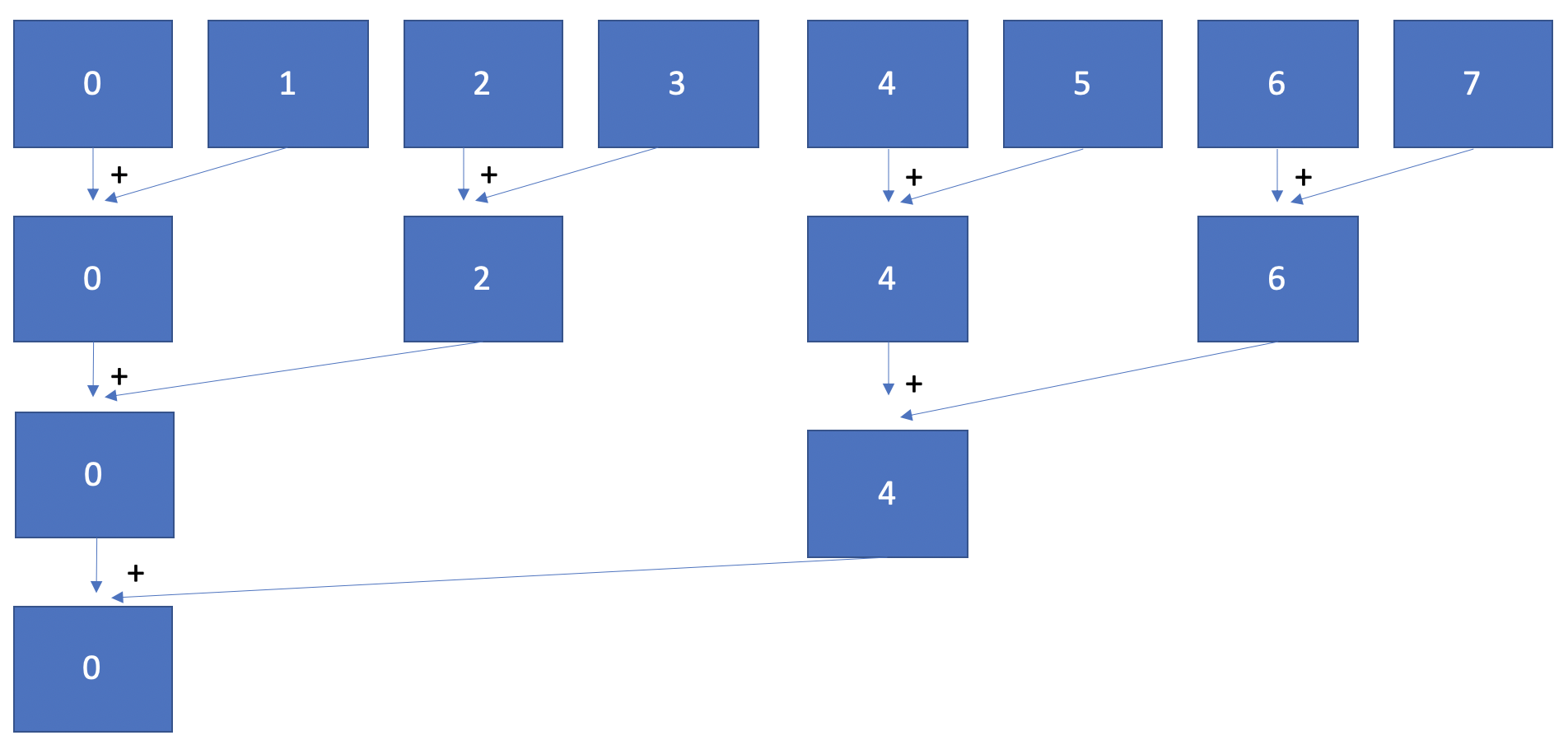
In you implementation, you can assume that we use a power-of-two number of processes.
There is a starter code pi_block_tree.c for you.
mpicc pi_block_tree.c -o pi_block_tree; run --mpi=pmix -N 4 -n 4 -- ./pi_block_tree 1000000000
Code Implementation: (12 points)
- Complete
pi_block_tree.c: the MPI block communication for PI. - Implement the code using a binary tree reduction algorithm with
MPI_Send/MPI_Recv. - Do not modify the output messages.
mpicc pi_block_tree.c -o pi_block_tree; run --mpi=pmix -N 4 -n 4 ./pi_block_tree 1000000000should run correctly.- The argument of
-Nis expected to be any power-of-two number less than or equal to 16. - Your program’s execution time should not be more than 15% slower than the TA’s reference time.
1.2.3 MPI Non-Blocking Communication & Linear Reduction Algorithm
Use non-blocking communication for the linear reduction operation (in Section 1.2.1).
Use a non-blocking
MPI_Irecv()(MPI Receive with Immediate return). The basic idea is that rank 0 is going to issue all the receive operations and then wait for them to finish. You can either useMPI_Wait()individually to wait for each request to finish orMPI_Waitall(). Regardless of your decision, keep in mind that we want you to perform the receive operations in parallel. Thus, do not callMPI_Irecv()and immediatelyMPI_Wait()! In addition, we recommend you allocate an array ofMPI_Requestand also an array of counts (i.e., one for each receive needed).
There is a starter code pi_nonblock_linear.c for you.
mpicc pi_nonblock_linear.c -o pi_nonblock_linear; run --mpi=pmix -N 4 -n 4 -- ./pi_nonblock_linear 1000000000
Code Implementation: (12 points)
- Complete
pi_nonblock_linear.c: the MPI non-blocking communication for PI. - Implement the code using a non-blocking algorithm with
MPI_Send/MPI_IRecv/MPI_Wait/MPI_Waitall. - Do not modify the output messages.
mpicc pi_nonblock_linear.c -o pi_nonblock_linear; run --mpi=pmix -N 4 -n 4 -- ./pi_nonblock_linear 1000000000should run correctly.- The argument of
-Nis expected to be any positive integer less than or equal to 16. - Your program’s execution time should not be more than 15% slower than the TA’s reference time.
1.2.4 MPI Collective: MPI_Gather
Use the collective MPI_Gather() operation, instead of point-to-point communication.
You can keep rank 0 as the root of the communication and still make this process aggregate manually the intermediate counts. Remember that the goal of
MPI_Gather()is to provide the root with an array of all the intermediate values. Reuse the array of counts as the output for the gather operation.
There is a starter code pi_gather.c for you.
mpicc pi_gather.c -o pi_gather; run --mpi=pmix -N 4 -n 4 -- ./pi_gather 1000000000
Code Implementation: (12 points)
- Complete
pi_gather.c: the MPI gather communication for PI. - Implement the code using
MPI_Gather. - Do not modify the output messages.
mpicc pi_gather.c -o pi_gather; run --mpi=pmix -N 4 -n 4 -- ./pi_gather 1000000000should run correctly.- The argument of
-Nis expected to be any positive integer less than or equal to 16. - Your program’s execution time should not be more than 15% slower than the TA’s reference time.
1.2.5 MPI Collective: MPI_Reduce
Use the collective MPI_Reduce() operation.
- Remember that the goal of
MPI_Reduce()is to perform a collective computation. Use theMPI_SUMoperator to aggregate all the intermediate count values into rank 0, But, watch out: rank 0 has to provide its own count as well, alongside the one from the other processes.- The send buffer of
MPI_Reduce()must not match the receive buffer. In other words, use a different variable on rank 0 to store the result.
There is a starter code pi_reduce.c for you.
mpicc pi_reduce.c -o pi_reduce; run --mpi=pmix -N 4 -n 4 -- ./pi_reduce 1000000000
Code Implementation: (12 points)
- Complete
pi_reduce.c: the MPI reduce communication for PI. - Implement the code using
MPI_Reduce. - Do not modify the output messages.
mpicc pi_reduce.c -o pi_reduce; run --mpi=pmix -N 4 -n 4 -- ./pi_reduce 1000000000should run correctly.- The argument of
-Nis expected to be any positive integer less than or equal to 16. - Your program’s execution time should not be more than 15% slower than the TA’s reference time.
1.2.6 MPI Windows and One-Sided Communication & Linear Reduction Algorithm
Use MPI Windows and MPI one-sided communication, which we didn’t cover this in class. You can choose the functions you’d like to use but remember that there is a reduction on the same MPI window from many processes! You may refer to one_side_example.c to get familiar with it.
There is a starter code pi_one_side.c for you.
mpicc pi_one_side.c -o pi_one_side; run --mpi=pmix -N 4 -n 4 -- ./pi_one_side 1000000000
Code Implementation: (12 points)
- Complete
pi_one_side.c: the MPI one sided communication for PI. - Implement the code using
MPI_Win_*(orMPI_Put,MPI_Get, andMPI_Accumulate). You only need to implement the first one, and the remainings are optional. - Do not modify the output messages.
mpicc pi_one_side.c -o pi_one_side; run --mpi=pmix -N 4 -n 4 -- ./pi_one_side 1000000000should run correctly.- The argument of
-Nis expected to be any positive integer less than or equal to 16. - Your program’s execution time should not be more than 15% slower than the TA’s reference time.
2. Part 2: Matrix Multiplication with MPI
Write a MPI program which takes an $n \times m$ matrix $A$ and an $m \times l$ matrix $B$, and stores their product in an $n \times l$ matrix $C$. An element of matrix $C$ is obtained by the following formula:
\[c_{ij} = \sum_{k=1}^m a_{ik}b_{kj}\]where $a_{ij}$, $b_{ij}$ and $c_{ij}$ are elements of $A$, $B$, and $C$, respectively.
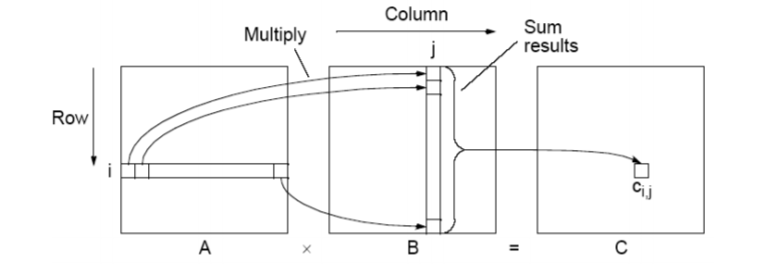
Your mission is to calculate the matrix multiplication as fast as possible. You may try many methods (Ex: tiling or some algorithms. Note that SIMD isn’t allowed here!) to achieve a higher performance. You are allowed to use any code on the Internet, but you need to re-write the code yourself, which means copying and pasting is not allowed. In addition, you are not allowed to use any third-party library; that is, you have to write your MPI program from scratch. Furthermore, each node is allowed to run a single-threaded process, so using OpenMP, Pthread, fork, GPU, etc. are not allowed.
If you are not sure about the rule, ask on our E3 forum!
Constraints
- $1 ≤ n, m, l ≤ 10000$
- $0 ≤ a_{ij}, b_{ij} ≤ 100$
Data Sets
There are two data sets. The table shows the credit, the range of $n$, $m$, and $l$, and the hosts used for each data set. You can find the data sets in /data/pp/hw4/test.
| Set | Credit | n, m, l |
|---|---|---|
| 1 | 10 points | 300-500 |
| 2 | 10 points | 1000-2000 |
You may have different implementations for the two data sets.
Notice that only one process per node is allowed.
Here is an example of how to run program with specific data set and verify result:
run --mpi=pmix -N 4 -n 4 -- ./matmul /data/pp/hw4/test/data1_1 > my_ans1_1
diff my_ans1_1 /data/pp/hw4/test/ans1_1
If the answer is correct, the only difference you’ll see is the printed MPI running time:
MPI running time: 0.062525 Seconds
3. Requirements
3.1 Requirements for Part One
- Code implementation (following the instructions in Sections 1.2.1-1.2.6
hello.cpi_block_linear.cpi_block_tree.cpi_gather.cpi_nonblock_linear.cpi_reduce.cpi_one_side.c
3.2 Requirements for Part Two
- Code implementation
- You should implement the functions in
matmul.ccto calculate the matrix multiplication as described in Section 2. - Your program will be evaluated with command
make -B; run --mpi=pmix -N %N% -n %n% -- ./matmul %data_file%, whereN, nis 2-8, anddata_fileis the input.
- You should implement the functions in
4. Grading Policy
NO CHEATING!! You will receive no credit if you are found cheating.
Total of 100%:
- part 1 (70%):
- Implementation correctness and performance
- part 2 (30%):
- Performance: 30% (15% for each data set)
- Evaluations will be conducted for each data set with the metric below.
- Performance: 30% (15% for each data set)
Metric (for each data set):
Submissions no slower than the execution thresholds earn 33%(5 point for each dataset). The remaining 66% will be assigned based on your execution time ranking among the class.
5. Evaluation Platform
Your program should be able to run on UNIX-like OS platforms. We will evaluate your programs on the workstations dedicated for this course.
The workstations are based on Debian 12.9 with Intel(R) Core(TM) i5-10500 CPU @ 3.10GHz processors and GeForce GTX 1060 6GB. g++-12, clang++-11, and CUDA 12.8 have been installed.
Please run the provided testing script test_hw4 before submitting your assignment.
Run test_hw4 in a directory that contains your HW4_XXXXXXX.zip file on the workstation. test_hw4 checks if the ZIP hierarchy is correct and runs graders to check your answer, although for reference only. For performance tuning with faster feedback, you can pass the -s (--skip-part1) option to skip the testing of Part 1.
test_hw4 <your_student_id>:
- Check if the ZIP hierarchy is correct.
- Part 1: Check the correctness and the performance.
- Part 2: Evaluate the performance for the public data (in average time).
6. Submission
All your files should be organized in the following hierarchy and zipped into a .zip file, named HW4_xxxxxxx.zip, where xxxxxxx is your student ID.
Directory structure inside the zipped file:
HW4_xxxxxxx.zip(root)part1hello.cpi_block_linear.cpi_block_tree.cpi_gather.cpi_nonblock_linear.cpi_reduce.cpi_one_side.c
part2matmul.cc
Zip the file:
zip HW4_xxxxxxx.zip part1/*.c part2/matmul.cc
Be sure to upload your zipped file to new E3 e-Campus system by the due date.
You will get NO POINT if your ZIP’s name is wrong or the ZIP hierarchy is incorrect.
You will get a 5-point penalty if you hand out unnecessary files (e.g., obj files, .vscode, .__MACOSX).