Programming Assignment VI: OpenCL Programming
Parallel Programming by Prof. Yi-Ping You
Due date: 23:59, December 11, Thursday, 2025
The purpose of this assignment is to familiarize yourself with OpenCL programming.
Table of contents
We provide workstations dedicated to this course. You can access the workstations by ssh or use your own environment to complete the assignment.
| Hostname | IP |
|---|---|
| hpclogin[01-03].cs.nycu.edu.tw | 140.113.17.[101-103] |
Login example:
ssh <username>@hpclogin[01-03].cs.nycu.edu.tw
Additionally, we have configured the environment for you, which MUST be activated before running the assignment code using the following command:
module load ppYou can leave the environment by typing
module unload pp
Get the source code:
wget https://nycu-sslab.github.io/PP-f25/assignments/HW6/HW6.zip
unzip HW6.zip -d HW6
cd HW6
1. Image convolution using OpenCL
Convolution is a common operation in image processing. It is used for blurring, sharpening, embossing, edge detection, and more. The image convolution process is accomplished by doing a convolution between a small matrix (which is called a filter kernel in image processing) and an image. You may learn more about the convolution process at Wikipedia: Convolution.
Figure 1 shows an illustration of the concept of applying a convolution filter to a specific pixel, value of which is 3. After the convolution process, the value of the pixel becomes 7—how the resulting value is computed is illustrated on the right of the figure.
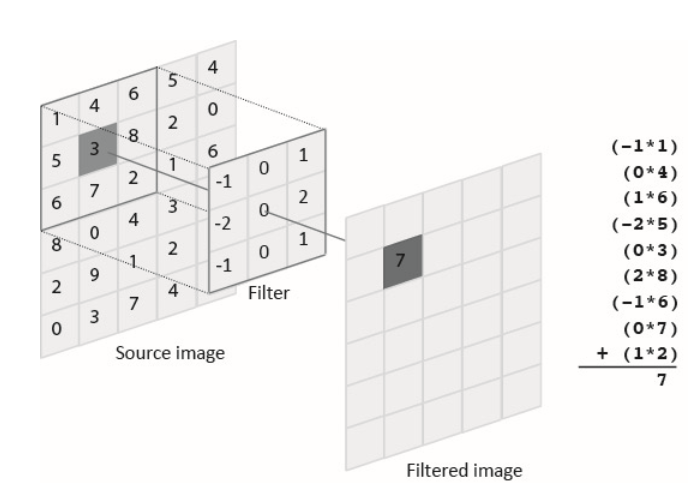
Figure 1. Applying a convolution filter to the dark gray pixel of the source image (value of which is 3).
In this assignment, you will need to implement a GPU kernel function for convolution in OpenCL by using the zero-padding method. A serial implementation of convolution can be found in serial_conv() in serial_conv.c. You can refer to the implementation to port it to OpenCL. You may refer to this article to learn about the zero-padding method. Figure 2 shows an example of applying the zero-padding method to the source image (on the left) and thereby resulting a same-size, filtered output image (on the right).

Figure 2. Applying the zero-padding method to a source image.
Your job is to parallelize the computation of the convolution using OpenCL. A starter code that spawns OpenCL threads is provided in function host_fe(), which is located in host_fe.c. host_fe() is the host front-end function that allocates memories and launches a GPU kernel, called convolution(), which is located in kernel.cl.
Currently host_fe() and convolution() do not do any computation and return immediately. You should complete these two functions to accomplish this assignment.
You can build the program by typing make, and run the program via run -- ./conv. Your program should read an input image from input.bmp, perform image convolution, and output the result image into output.bmp.
You can use the following command to test your own image:
run -- ffmpeg -i source.png -pix_fmt gray -vf scale=600:400 destination.bmp
You can use a different filter kernel by adding option -f N when running the program (i.e., run -- ./conv -f N), where N is either 1 (by default), 2, or 3, and indicates which filter kernel is used. Each filter kernel is defined in a CSV file (filter1.csv, filter2.csv, or filter3.csv). The first line of the CSV file defines the width (or height) of the filter kernel, and the remaining lines define the values of the filter kernel.
2. Requirements
You will modify only host_fe.c and kernel.cl.
Note: You cannot print any message in your program.
3. Grading Policy
NO CHEATING!! You will receive no credit if you are found cheating.
Total of 100%:
- Correctness (60%): 20% for each of the three filters (
filter1.csv,filter2.csv, andfilter3.csv). The breakdown of the 20%:- 10%: Your parallelized program passes the verification.
- 10%: The speedup over the serial version should be greater than 5.0 for filter1 and 3, 4.0 for filter2.
- Performance (40%): The total execution time for all three filters is compared against the reference time. See the metric below.
Metric:
\[\begin{cases} 40\%, \text{if} \; Y < R \times 2 \\\\ 20\%, \text{otherwise} \; \end{cases} + \begin{cases} \frac{T-Y}{T-R} \times 60\%, \text{if} \; Y < T \\\\ 0\%, \text{otherwise} \; \end{cases}\]Where $Y$ and $R$ represent your program’s execution time and the reference time, respectively, and $T = R \times 1.5$.
All submissions receive a minimum of 20%. Programs no slower than 2x the reference time earn 40%. The remaining 60% is scaled based on runtime relative to the reference time.
4. Evaluation Platform
Your program should be able to run on UNIX-like OS platforms. We will evaluate your programs on the workstations dedicated for this course. You can access these workstations by ssh with the following information.
The workstations are based on Debian 12.9 with Intel(R) Core(TM) i5-10500 CPU @ 3.10GHz processors and GeForce GTX 1060 6GB. g++-12, clang++-11, CUDA 12.8, and OpenCL 3.0 have been installed.
Please run the provided testing script test_hw6 before submitting your assignment.
Run test_hw6 in a directory that contains your HW6_XXXXXXX.zip file on the workstation. test_hw6 checks if the ZIP hierarchy is correct and runs graders to check your answer, although for reference only.
test_hw6 <your_student_id>
5. Submission
All your files should be organized in the following hierarchy and zipped into a .zip file, named HW6_xxxxxxx.zip, where xxxxxxx is your student ID.
Directory structure inside the zipped file:
HW6_xxxxxxx.zip(root)kernel.clhost_fe.c
Zip the file:
zip HW6_XXXXXXX.zip kernel.cl host_fe.c
Be sure to upload your zipped file to new E3 e-Campus system by the due date.
You will get NO POINT if your ZIP’s name is wrong or the ZIP hierarchy is incorrect.
You will get a 5-point penalty if you hand out unnecessary files (e.g., obj files, .vscode, .__MACOSX).